I Tested the G502 Proteus Spectrum for a Month: Here is My Verdict
In the rapidly evolving landscape of gaming peripherals, few names carry as much historical weight as the Logitech G502 series. For years, this specific silhouette has defined what many enthusiasts consider to be the "all-purpose" gaming mouse. While newer iterations like the Hero and the Lightspeed wireless variant have since taken the spotlight, the G502 Proteus Spectrum remains a fascinating case study in ergonomics, sensor reliability, and industrial design. After thirty days of intensive testing involving high-stakes competitive gaming, creative productivity workflows, and general daily browsing, this verdict aims to dissect whether this legendary hardware still holds up in a market increasingly obsessed with ultra-lightweight designs and minimalist aesthetics.
The G502 Proteus Spectrum is essentially an evolutionary step from the original Core model, introducing RGB lighting and maintaining the high-performance PMW3366 sensor. For a month, this device served as the primary interface for a workstation and gaming setup, replacing a modern lightweight honeycombed mouse. This transition provided deep insights into how weight distribution, button layout, and mechanical feedback influence both performance and physical comfort over extended periods.
The Ergonomic Philosophy and Build Quality
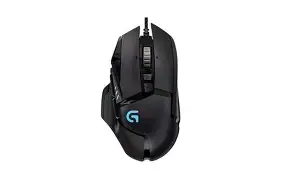
At first glance, the G502 Proteus Spectrum looks like a piece of equipment salvaged from a futuristic cockpit. It is unapologetically "gamer" in its aesthetic, featuring sharp angles, a mix of matte and glossy plastics, and a distinctive thumb rest. However, beneath the aggressive exterior lies one of the most comfortable ergonomic shapes ever devised for right-handed users. The contouring of the mouse promotes a natural grip, particularly for those who utilize a palm or claw style.
The build quality is substantial. Unlike many modern mice that feel hollow to achieve weight targets, the Proteus Spectrum feels like a solid block of technology. There is no structural flex when squeezing the sides, and the primary buttons (left and right click) are rated for 20 million clicks. During the month-long test, the mechanical tensioning system in the primary buttons provided a consistent, tactile snap that didn't degrade from day one to day thirty. The rubberized side grips, which feature an intricate triangular texture, provide excellent friction even during heated sessions where palm sweat might otherwise cause slippage.
The Weight Debate: A Matter of Momentum
One cannot discuss the G502 without addressing its mass. Out of the box, the mouse weighs approximately 121 grams without the cable. While the current trend in the industry is to push weights below 60 grams, the G502 leans into its heft. It includes a hexagonal door on the bottom that allows users to add up to five 3.6g weights. For a month, I experimented with various configurations, eventually settling on a "bottom-heavy" setup that added two weights near the rear. The impact on gameplay is immediate: whereas a light mouse allows for instantaneous "flick" shots, the G502 offers a sense of stability and momentum. It is a "cruiser" rather than a "sprint car," making it exceptional for tracking targets in games like Battlefield or Apex Legends where smooth, consistent movement is often more beneficial than erratic twitching.
Detailed Feature Analysis
The PMW3366 Sensor Performance
The heart of the Proteus Spectrum is the PixArt PMW3366 sensor, widely regarded as one of the best optical sensors of its era. Even by today's standards, its performance is flawless. Throughout the month, there were zero instances of "spin-outs," jitter, or pixel skipping. The sensor offers a DPI range from 200 to 12,000, which can be adjusted in increments of 50 via the Logitech Gaming Software. What makes this sensor stand out is the lack of filtering or acceleration across the entire range. This means the movement on the screen is a 1:1 representation of the physical movement on the desk, providing a high degree of "muscle memory" reliability.
The Dual-Mode Infinite Scroll Wheel
Perhaps the most famous feature of the G502 is its heavy metal scroll wheel. By pressing a mechanical button just below the wheel, the user can toggle between a traditional notched "clicky" mode and a frictionless "infinite" spin mode. This feature proved indispensable during the month of testing. For gaming, the notched mode ensures precise weapon switching. For productivity—such as scrolling through massive Excel spreadsheets or long web articles—the infinite spin is a revelation. Once you become accustomed to flicking the wheel and watching it spin for 15 seconds, going back to a standard scroll wheel feels like a regression in efficiency.
Shop the latest Electronics picks on Amazon.
Browse Now →Button Programmability and Layout
The G502 Proteus Spectrum boasts 11 programmable buttons. These are strategically placed to be accessible without requires significant hand repositioning.
- The "Sniper" button: Located right where the thumb naturally rests, it drops the DPI to a pre-set level for precise aiming.
- G4 and G5 side buttons: Standard "back" and "forward" buttons that have a distinct enough gap to avoid accidental presses.
- G7 and G8 buttons: Placed to the left of the primary click, usually used for DPI cycling but highly effective for secondary game commands like reloading or healing.
A Comparative Overview
To help prospective buyers understand where the Proteus Spectrum sits in the hierarchy of performance mice, the following table compares it to standard gaming peripheral expectations.
| Feature | G502 Proteus Spectrum | Standard Competitive Mouse | Minimalist Lightweight Mouse |
|---|---|---|---|
| Weight | 121g - 139g (Adjustable) | 90g - 105g | 50g - 70g |
| Sensor | PMW3366 Optical | Varies (usually mid-tier) | Top-tier Low-latency |
| Buttons | 11 Programmable | 5 to 6 | 5 (Optimized for weight) |
| Connectivity | Braided Cable | Rubber Cable | Wireless or Paracord |
| Specialty | All-purpose / Productivity | General Gaming | First-Person Shooters (FPS) |
Pros and Cons: The One-Month Breakdown
After heavy use, certain aspects of the mouse became clear advantages, while others surfaced as minor annoyances or deal-breakers depending on the user's priorities.
What We Loved (Pros)
- Superior Ergonomics: The thumb rest and the overall slope of the mouse prevent hand cramping during 8-hour sessions.
- The Infinite Scroll Wheel: As much a productivity tool as a gaming feature; it is addictive and highly functional for work.
- Tactile Feedback: Every button press feels deliberate. The primary switches have a satisfying mechanical "clink" that provides great auditory and tactile confirmation.
- Advanced Tuning: The surface tuning calibration in the software allows the sensor to optimize itself for different mousepad materials (cloth, hard plastic, or desk surface).
- Durability: After 30 days of 10+ hours of daily use, the mouse shows no signs of wear, glossing on the plastic, or sensor degradation.
The Trade-offs (Cons)
- Cable Stiffness: The thick braided cable is durable, but it is quite stiff. Without a mouse bungee, it can push against the mouse or drag on the desk, creating "cable drag" that interferes with fine movements.
- Weight Fatigue: For purely competitive FPS gaming (like CS:GO or Valorant), the weight can eventually lead to wrist fatigue if you play at a low sensitivity and move your arm frequently.
- Dust Magnet: The intricate design with many crevices and gaps between the buttons means it collects dust and skin oils more easily than a smooth-shelled mouse.
- Loud Scroll Wheel: In "notched" mode, the scroll wheel is quite loud, which might be distracting in a quiet office environment.
Buying Guide: Is This Mouse for You?
When choosing a mouse like the G502 Proteus Spectrum, buyers should look beyond the marketing jargon and consider their specific use case. This is not a "one-size-fits-all" device, despite its popularity. Here are the primary factors to consider before investing in this specific model.
Consider Your Grip Style
The G502 is specifically sculpted for Palm and Claw grips. If you have very small hands or use a Fingertip grip (where only the tips of your fingers touch the mouse), the length and weight of the Proteus Spectrum might feel cumbersome. Those with medium to large hands will find it fits like a glove.
Gaming vs. Productivity Balance
If you are a student or a professional who games on the side, the G502 is arguably the best value on the market. The ability to map macros to the 11 buttons for software like Photoshop, Premiere Pro, or AutoCAD is a massive productivity booster. However, if your only goal is to climb the ranks in a competitive shooter where rapid 180-degree turns are common, you should weigh the benefits of its features against the physical cost of its weight.
Discover deals on Electronics — updated daily.
See Deals →Setup Environment
Because of the stiff braided cable, the G502 requires a decent amount of desk space to move freely. Buyers should ensure they have a consistent mousepad surface. While the sensor is excellent on most surfaces, it truly shines on a high-quality cloth pad where the weight can be managed with a bit of controlled friction.
Conclusion: The Verdict After 30 Days
Testing the G502 Proteus Spectrum for a month served as a reminder that "newest" isn't always "best." In an era where the industry is stripping away features to save every possible gram of weight, the Proteus Spectrum stands as a testament to the "more is more" philosophy. It is a feature-rich powerhouse that refuses to compromise on utility.
The sensor remains among the elite, providing accuracy that rivals any modern flagship. The ergonomics are master-class, and the software ecosystem is mature and stable. While the weight might be a deterrent for the ultra-competitive "pro-gamer" demographic, for the remaining 90% of users who want a reliable, comfortable, and versatile tool for both destroying enemies in-game and clearing out an inbox at work, the G502 remains a top-tier choice.
It is a mouse that rewards the user for learning its nuances—from the specific weight distribution to the multi-button macros. While the cable is a bit dated and the weight is significant, the sheer satisfaction of the build quality and the genius of the infinite scroll wheel make it a peripheral that is hard to put down. For those who value a "planted" feel and total control over their desktop environment, the verdict is clear: the G502 Proteus Spectrum is a classic for a reason, and it still earns its place on any serious gamer's desk today.